A new platform, a new advantage
In January 2026, EPSO launched its new testing platform: TAO, built by Open Assessment Technologies (OAT), a Luxembourg-based company owned by Uchida Yoko Co., Ltd. (Japan). This platform replaces the previous testing system and will be used for all EPSO competitions until at least 2029 (the contract is worth €16.7 million over 4 years).
If you're preparing for any EPSO competition — AD5, CAST, AST, or specialist — you will take your test on TAO.
And here's the good news: knowing the platform gives you a real competitive advantage.
What we learned from the first real test
On 27 January 2026, EPSO conducted its first live test on TAO for the building management competition (EPSO/AD/425/25). The official data:
- 3,170 applicants were invited
- 2,249 connected to the platform
- ~91% of connected candidates completed all three tests successfully
Key insights from candidates who took the test:
- There are brief pauses between test segments — use them to reset mentally
- Technical support is available if needed — EPSO offered re-testing for justified cases
- Candidates who had familiarised themselves with the interface felt calmer and more focused
The takeaway is clear: knowing the platform before exam day gives you a real confidence boost — and that confidence translates directly into better performance.
How TAO works: the interface
Three separate timed blocks
Unlike what many expect, the exam is not one continuous session. You complete three (or more) separate timed tests, submitting each before starting the next:
- Verbal Reasoning → Submit → Wait
- Numerical Reasoning → Submit → Wait
- Abstract Reasoning → Submit → Done
For AD5, additional blocks follow: EU Knowledge, Digital Skills, and the written essay.
Key point: Once you submit a block, you cannot go back to change answers.
The navigation bar
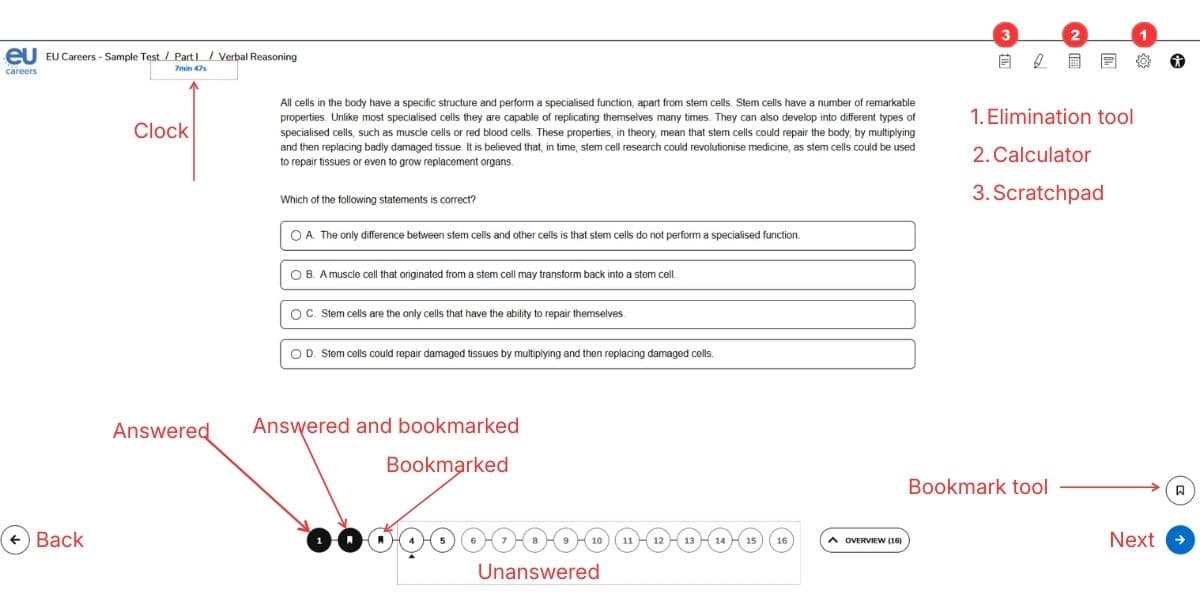
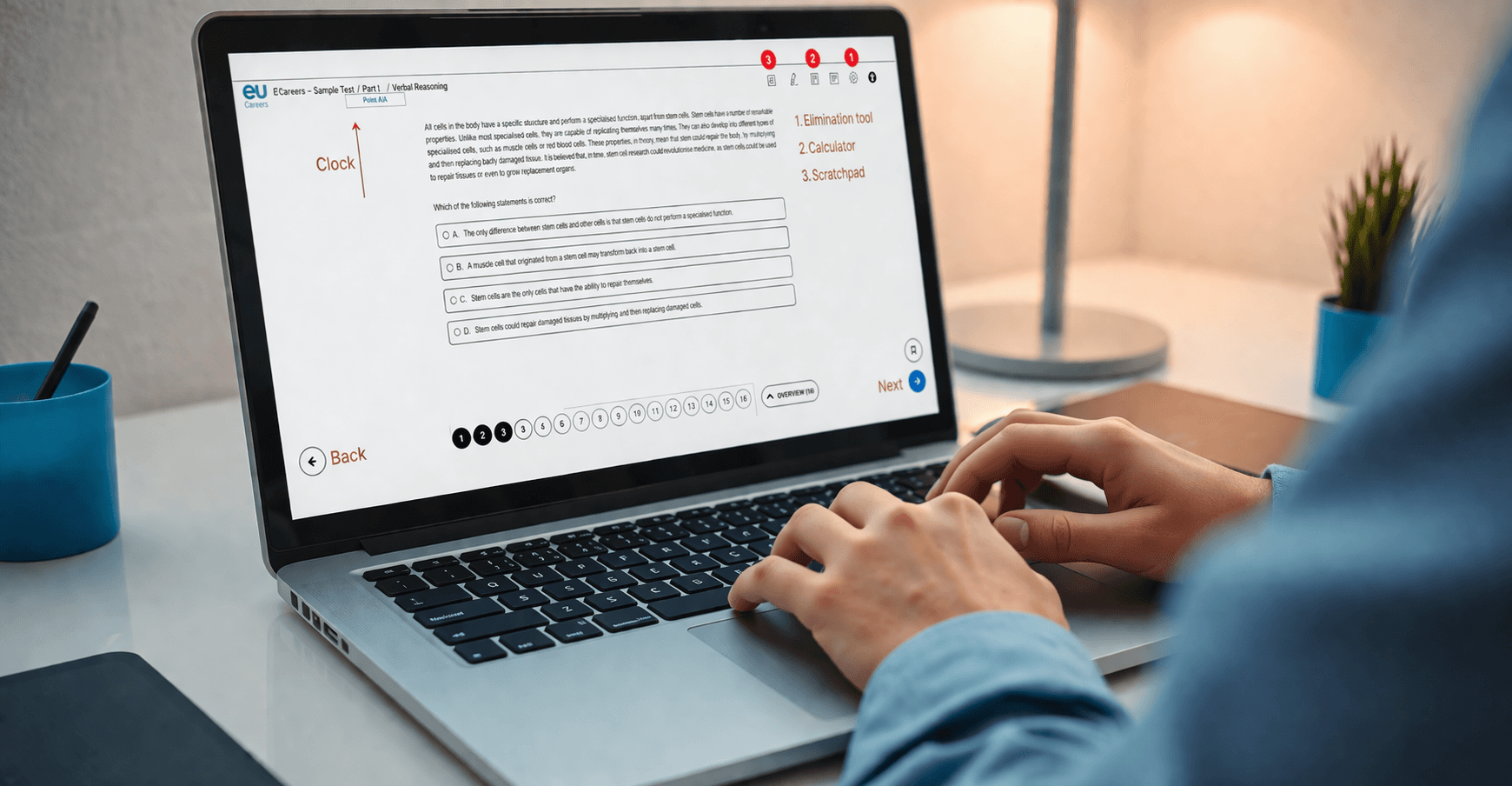
At the top of each test block, TAO displays a question navigation bar — a row of numbered circles:
- Filled/dark circle = answered
- Empty circle = not yet answered
- Bookmark icon = flagged for review
You can click any number to jump to that question. This means you don't have to answer sequentially — you can skip difficult questions and return to them.
Strategy: On your first pass, answer every question you're confident about. Flag uncertain ones. Use remaining time to revisit flagged questions.
The timer
The countdown timer is small and positioned in a corner — easy to overlook. This is by design: EPSO wants to test your time management under realistic conditions.
Strategy: Check the timer after every 5 questions. If you're spending more than your allocated time per question (e.g., 1:45 for VR), move on immediately.
Powerful tools you can use to your advantage
TAO includes several built-in tools that can significantly boost your performance. They're not prominently displayed, so learning about them now puts you ahead of the curve.
1. Answer Elimination (hidden in Settings)
This is one of the most valuable tools on the platform — and now you know where to find it. Located in the Settings menu, it lets you click boxes beside answer options to visually mark ones you've ruled out.
Why it matters: In a 4-option question, eliminating even 1 distractor doubles your odds on an educated guess. The visual strike-through helps you think clearly under pressure.
2. Calculator
A basic calculator with: +, −, ×, ÷, %, +/−
Important details:
- The font is small
- Keyboard input is faster than clicking buttons
- Available during Numerical Reasoning
Strategy: Practice mental math for simple operations. Use the calculator only for multi-step calculations or when you need to verify.
3. Scratchpad
A plain text entry field for intermediate notes and calculations.
Strategy: For Numerical Reasoning, write down intermediate values as you calculate. This prevents errors from trying to hold too many numbers in your head.
4. Line Reader & Highlighter
Focus aids for Verbal Reasoning passages. The Line Reader creates a movable window that highlights one line at a time. The Highlighter lets you mark key phrases.
Strategy: Use the Line Reader if you find yourself re-reading passages. Highlight the specific phrases that support or contradict each answer option.
5. Accessibility settings
TAO offers customizable color themes and contrast options. Even if you don't have accessibility needs, adjusting the contrast can reduce eye fatigue during a 2+ hour exam session.
What this means for your preparation
Practice the format, not just the content
Knowing that Lisbon established the EU's current structure is necessary. But knowing how TAO presents the question, where the timer is, how to flag and skip, and where to find the elimination tool — that's what separates a prepared candidate from everyone else.
Get comfortable with separate timed blocks
Practice completing 20 Verbal Reasoning questions in exactly 35 minutes, then stopping. Then 10 Numerical in 20 minutes. Then 10 Abstract in 10 minutes. The mental reset between blocks is part of the challenge.
Learn the keyboard shortcuts
On exam day, every second counts. If you can type calculations into the calculator instead of clicking tiny buttons, you save 5–10 seconds per NR question — that's up to 100 seconds over 10 questions.
The bottom line
TAO is EPSO's testing platform for the foreseeable future. The €16.7M contract runs until at least 2029. Every EPSO candidate — AD5, CAST, AST, specialist — will face this exact interface.
The candidates who practice on the format will feel at home on exam day — calm, confident, and ready to focus entirely on the questions. That familiarity can translate into extra productive minutes while others are still orienting themselves.
Make the platform your advantage. Walk in feeling like you've been here before — because you have.
EU·Now replicates the TAO exam interface so you can practice in the same environment you'll face on test day. Join the waitlist at eu-now.com.